
M
o
r
e
t
h
a
n
a
S
w
i
n
g
B
a
s
e
d
o
n
P
r
e
c
i
s
e
D
a
t
a
&
A
I
More than 100 clients around the world have chosen Laon SwingCraft’s products.
The key to improving golf performance lies in swing and shot.
Uncover and overcome weaknesses with AI technology and an immersive simulator.
Laon SwingCraft provides an all-in-one training solution that enables golfers to train independently.
+Cumulated Data
+Users
sProcessing Speed
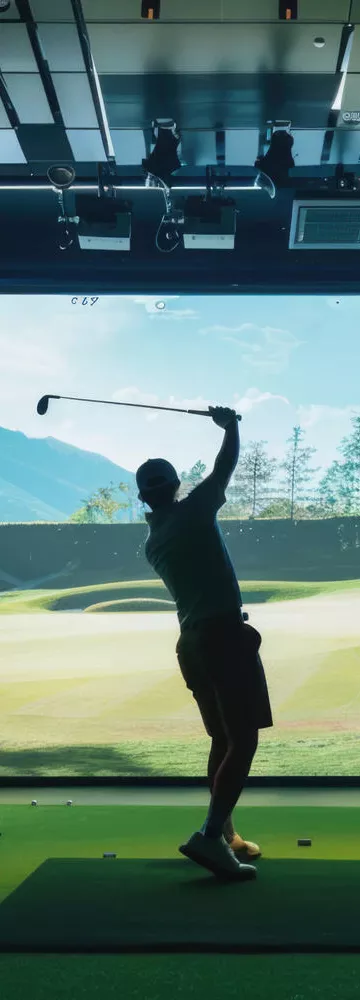
PRODUCT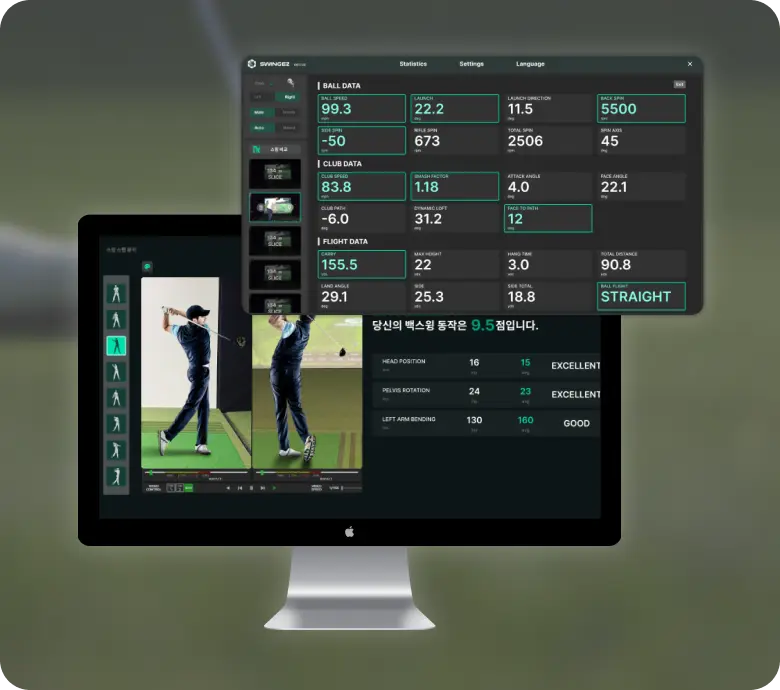 SwingEZ is an AI self-training solution that helps users identify and correct their own swing issues through AI-powered swing analysis and a realistic simulator environment that closely replicates actual playing conditions.

AI based Self-Training Solution
SwingEZLaunch Monitor + Swing analysis cameras+ simulator
based on Unity6
Personalized training solution by AI analysis
Provides training maps for various environments
At first, I was worried about accuracy without markers —
but I was amazed by how precise it actually is.
That Realtime feedback during the lesson has made our members much more satisfied.



Easy to install and use anywhereNo stickers. No complicated equipment.
Using only a ceiling-mounted sensor and a single camera, it precisely analyzes swing data within 0.25 seconds. Designed for easy access and consistent use by golfers of all levels.

Delivering tailored user information with AIPowered by Laon SwingCraft’s advanced AI technology, it enables precise posture correction and data-driven, self-guided training — helping every golfer experience the true foundation of a proper swing.

reliable quality and Ongoing after-sales supportOur commitment continues even after installation.
The customer support team is always ready to provide
quick troubleshooting whenever needed.
Automatic software updates keep the system always up to date.

My VTrack shows "Device Not Found" error.
Please check if the Power LED (red) and Ethernet LED (green blinking) are working properly. In your Ethernet adapter advanced settings, set Jumbo Packet to 9014 Bytes and Receive/Transmit Buffers to Maximum. Use static IP 172.16.1.100 for right-handed setup or 172.16.0.100 for left-handed setup. If the issue persists, contact service@laonpeople.com or visit laonswingcraft.com/en/contact.
What are the PC requirements for VTrack?
Windows 10/11 (64-bit), Dual Core 3.0GHz or higher, and RAM 16GB or more are required. A 1Gb Gigabit Ethernet NIC with Jumbo Packet support is essential. Intel Pro/1000 class is recommended. The recommended mounting height is 259-300cm (102-118 inches).
VTrack won't install on Windows 11.
Smart App Control may block the installation. Go to Settings, then Privacy and Security, Windows Security, and App and Browser Control. Allow VTrack to run or temporarily disable the feature. You can re-enable it after installation is complete.
The camera feed is not displaying or calibration fails.
First check your Ethernet adapter settings. In Device Manager, go to your adapter's Advanced tab and set Jumbo Packet to 9014 Bytes and Receive/Transmit Buffers to Maximum. Restart your PC after making changes. If the issue persists, contact service@laonpeople.com.
Spin readings don't match my expectations.
Verify that the mounting height is within the recommended range of 259-300cm. Lower mounting heights can affect backspin measurements. Position the ball with its logo facing the camera for improved detection accuracy. Using clean, high-quality golf balls is recommended.
My shots show excessive hook or slice.
First verify that the device is precisely aligned with the screen center and mounted level. Re-run calibration. Ensure the golf ball is clean and position it with the logo facing the camera. If the issue persists, send your ShotData files to service@laonpeople.com for analysis.
How do I connect VTrack to third-party simulator software?
Install the latest version of VTrackToolKit and activate the simulator-specific plugin. VTrack and the simulator PC must be connected to the same network. If the API connection drops, verify your VTrackToolKit version and restart.
Where is my shot data saved?
The ShotData storage path depends on your VTrackToolKit version.
※ Please check your VTrackToolKit version first.
v2.1.5 or later: C:\Users[YourUsername]\AppData\Local\Packages\02ce737d-b4f8-4bbb-92b2-1355681ff1e8_qbntr2denpnae\LocalState\LAON PEOPLE\LPGDLL\ShotData
v2.1.4 or earlier: C:\Users[YourUsername]\AppData\Local\LAON PEOPLE\LPGDLL\ShotData
The AppData folder is hidden by default. In File Explorer, check Hidden items in the View menu, or paste the path directly into the address bar.
The API connection drops after about 1 minute when using GSPro.
Please update VTrackToolKit to the latest version. Download from the Notice menu at laonswingcraft.com. If the issue persists after updating, contact service@laonpeople.com.
Where can I purchase VTrack?
Purchase through official resellers below.
For other regions, contact service@laonpeople.com.
US: sotasims.com
Canada: yourswing.golf
Europe: golfsimeurope.com
Australia: baysidegolf.com.au